
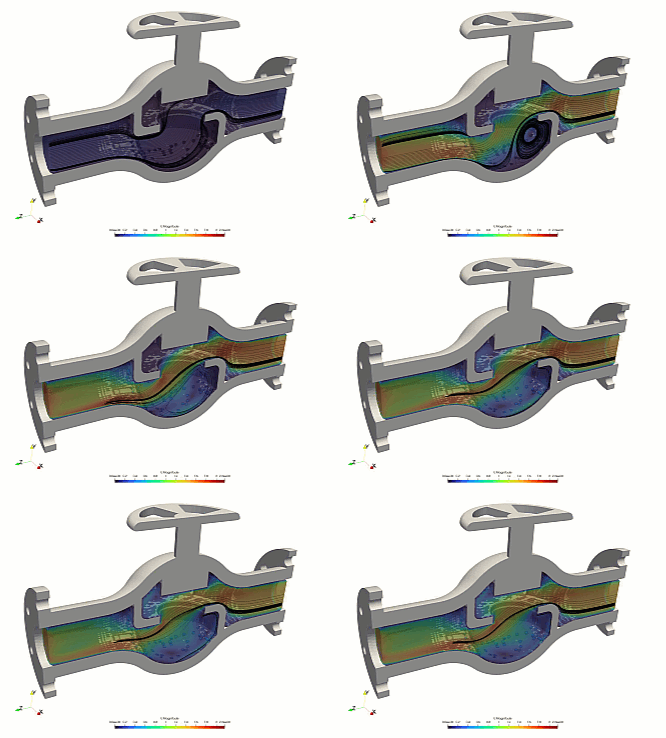
Introducing the tensorVLV Template
The tensorVLV template is a specialized folder within this project, created by author Caesar Wiratama, that focuses entirely on industrial valve simulations. It is designed to model internal fluid flow that is steady and incompressible, with the advanced ability to calculate pressure drops and vapor phase changes, also known as cavitation. This makes it perfect for analyzing how liquid behavior changes inside control valves, globe valves, or piping fixtures. If you use this specific template for your work, all that is asked is that you mention and give credit to tensorVLV in your reports or projects.
How to Run Your First Simulation
Running the simulation only takes a few simple commands in your computer’s terminal window. First, you run a command to unlock the automation scripts so your computer is allowed to open them. Next, you can run individual scripts to build your mesh grid and start the multi-processor calculation solver. Alternatively, you can simply type a single master command—called the Allrun script—to automatically handle the meshing and solving steps back-to-back. Finally, a cleanup script is included to safely wipe away old processor folders when you want to start fresh.
Changing the Valve 3D Shape
To test your own design, you prepare three separate 3D files in .obj format representing your valve’s solid body, the inlet face, and the outlet face. Make sure your models are watertight and scaled in meters before dropping them into the template folder to overwrite the default files. Next, you resize the virtual background box in your configuration setup so it fully encloses your new hardware. You must also ensure the template’s focus coordinate sits directly inside the fluid path rather than inside the metal wall. Once your shapes are aligned, rerun the mesh script to bake in the new design.
Adjusting Flow Rate and Liquid Pressures
You can customize the flow conditions by editing the plain text files inside the template’s starting directory. To change how much liquid passes through the valve, simply edit the inlet settings with your desired mass flow rate. You can also adjust the outlet pressure and fluid density to match your exact operating environment, while leaving the vapor settings at zero to let the software calculate where cavitation bubbles will naturally form.
A Quick Warning
Please keep in mind that this template is a development version. This means some of the background settings might not be perfectly optimized for every single scenario yet. The accuracy of the final answers depends entirely on your specific setup and shape, so pt-tensor.com does not take responsibility for the final simulation data. Always double-check your engineering results.
Author: Caesar Wiratama
Find me on Linkedin