
Introducing the tensorHydro Template
The tensorHydro template is a highly optimized, production-ready case setup designed specifically for simulating open-channel hydraulics and free-surface flows inside a transient CFD framework. Instead of relying on steady-state approximations that struggle with fluid interfaces, this template utilizes a Volume of Fluid (VOF) multiphase framework to achieve true free-surface capture. It automates the painful, manual setup of variable height initial conditions, phase boundary layers, and parallel processing schemes, allowing you to go from a raw geometric configuration to high-fidelity transient hydraulic results in minutes. If you use this specific template for your work, all that is asked is that you mention and give credit to tensorHydro in your reports or projects.
How the Fluid and Motion are Arranged
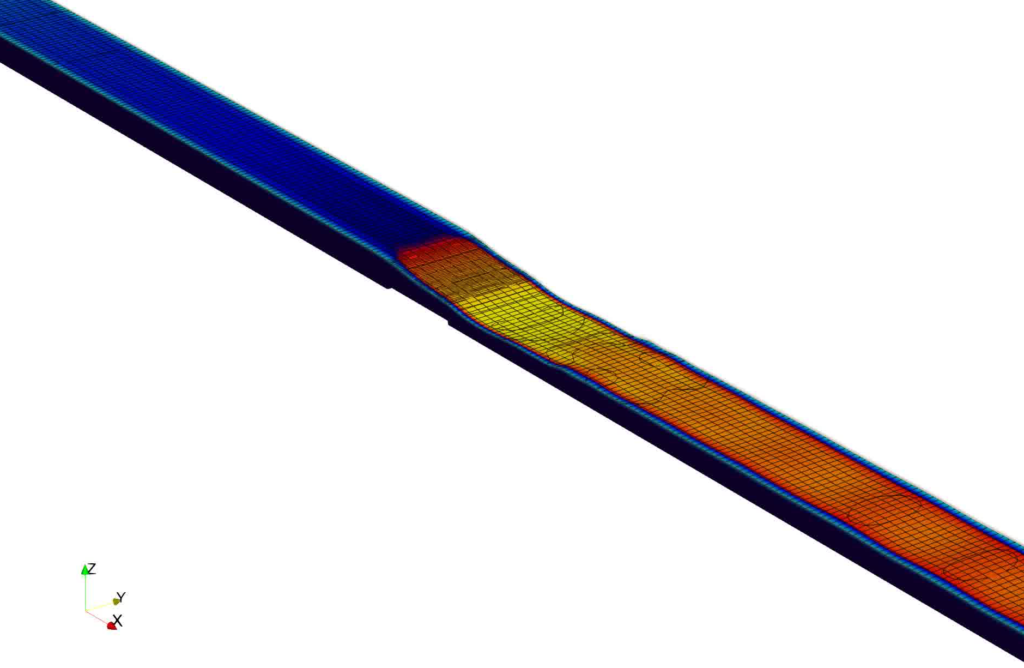
The template sets up a high-performance open-channel flow configuration using a standard water–air multiphase fluid system. The mesh architecture relies on a specialized blockMesh-only parametric hex channel spanning 10 meters along the X axis, 0.5 meters along the Y axis, and 0.8 meters along the Z axis. A mid-bed sill obstacle measuring 0.02 meters high and 0.5 meters long sits directly in the center of the channel. The fluid physics drive a supercritical inlet flow into a deeper, subcritical outlet pool, forcing a powerful hydraulic jump to form. The system boundary layer physics are resolved using the industrial-standard k-Omega SST turbulence model, ensuring the simulation accurately tracks intense energy dissipation and turbulent velocity profiles around the sill.
How to Run Your First Simulation
Running the simulation is handled through a few simple terminal commands inside your OpenFOAM environment.
- Mesh Pipeline Script: Run
./buildMeshto automatically generate the background structured hex block grid and configure your localized channel regions without relying on external STL files. - Coupled Execution Script: Execute
./Runto trigger a serial solver routine if your mesh and0/directory variables are already prepared. - One-Shot Master Script: Run
./Allrunor./Allrun-parallelto execute both the mesh building and parallel solving sequences back-to-back without interruption. The parallel pipeline automatically divides the domain across 8 parallel computer processors using ascotchsplit, runs the transientinterFoamsolver for a complete 20-second timeline, and seamlessly merges the split processor data back together once the calculation finishes. - Cleanup Script: A master
./Allcleanscript is available to instantly wipe away generated time folders, split processor chunks, and grid logs while safely preserving your underlying case parameters.
Adjusting Operating Conditions and Speeds
Changing your basic operational settings is incredibly easy and does not require digging through complex, hidden sub-folders. You can modify target runtime variables by opening a few centralized dictionary files:
- Flow Rates and Froude Numbers: Open
0.orig/Uto modify the inlet velocity and water lip height variables, allowing you to speed up or slow down the Froude number of your virtual supercritical flow. - Timeline Adjustments: Open
system/controlDictto adjust the overall simulationendTimeor change themaxCoandmaxAlphaCosettings to maintain fluid interface stability. - Fluid Mechanics: Open
constant/transportPropertiesto swap out or customize phase properties by typing in alternative kinematic viscosity or surface tension values.
Changing the 3D Channel Shape
To swap in your own custom channel layout, you modify the parametric blocks directly instead of using an STL or snappyHexMesh path. For the automated scripts to direct the physics correctly, you must sync your updates across two specific files:
- system/blockMeshDict: Represents the physical dimensions of the channel walls, floor, and sill obstacle. If your new design is longer, wider, or features a larger sill, expand your vertex coordinates and block cell density tags here.
- system/setFieldsDict: Represents the initial static water pool height. Ensure that the
boxToCellboundary coordinates precisely mirror your new initial supercritical inlet height (ℎ1) so the simulation begins from a physically balanced state.
If you rename or append new boundary patches during this process, ensure you update every matching sub-patch block entry inside the 0.orig/ directory (U, alpha.water, p_rgh, etc.) before initiating your run script.
A Quick Warning
Please keep in mind that this template is a development version designed as an un-coded, standard geometric demonstration. This means that advanced features—such as custom on-the-fly automated boundary calculations—are kept out of the box to maintain strict compatibility across standard ESI OpenFOAM v2406 environments. The accuracy of the final answers depends entirely on your specific setup, boundary adjustments, and grid density calibration, so pt-tensor.com does not take responsibility for the final simulation data. Always validate your engineering results against physical experiment data.