
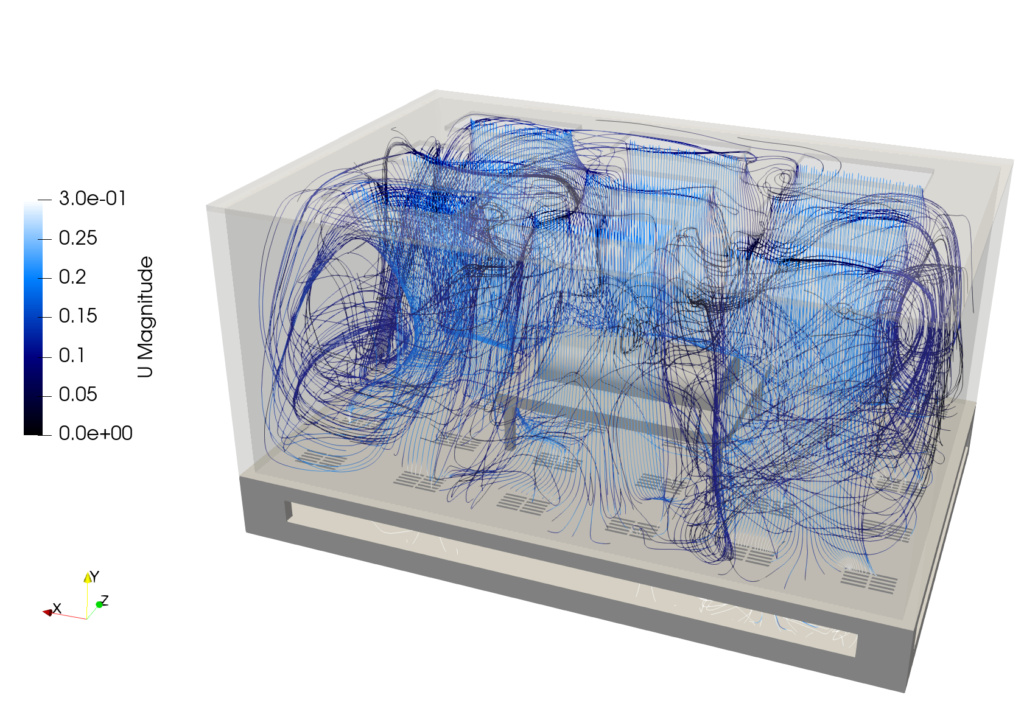
Introducing the tensorHVAC Template
The tensorHVAC template is a specialized folder within this project, created by author Caesar Wiratama, that focuses entirely on indoor climate control and ventilation. It uses a thermal buoyancy solver to simulate steady, heat-driven airflow. This makes it perfect for testing temperature distribution and airflow paths inside rooms, cafes, offices, or any enclosed spaces featuring air vents, walls, furniture, and occupants. If you use this specific template for your work, all that is asked is that you mention and give credit to tensorHVAC in your reports or projects.
How to Run Your First Simulation
Running the simulation only takes four simple commands in your computer’s terminal window. First, you run a command to unlock the automation scripts so your computer is allowed to open them. Second, you start the meshing script, which builds a virtual wind tunnel mesh around your object. Third, you launch the actual solver script to start the calculation. Finally, there is a cleanup script you can run whenever you want to wipe away old simulation data and start fresh.
Changing the Indoor 3D Shape
To simulate your own indoor space, export each part of your room (like walls, vents, and furniture) as individual .stl files using a single shared coordinate system. Place these files into the designated template folder. Next, open the template setup files to register your new parts—assigning them labels like inlet, outlet, walls, or objects. Finally, resize the virtual background box to fully enclose your room, and ensure the simulation’s focus point sits in the open air rather than inside a solid piece of furniture. Once your files are updated, run the mesh script to bake in your room layout.
Adjusting Ventilation and Room Temperatures
You can customize the climate settings by editing the text files inside the template’s startup directory. These files control air velocity, temperature, pressure, and thermal wall properties. To change your ventilation setup, simply edit the inlet settings with your desired supply air speed and temperature in Kelvin. You can also simulate heat sources by editing individual items, such as setting a fixed warm temperature on an object to represent a person or electronic equipment.
Author: Caesar Wiratama
Find me on Linkedin