
Introducing the tensorCYCL-DEM Template
The tensorCYCL-DEM template is a specialized folder within this project designed specifically for simulating dilute dust and fine-sand separation inside cyclone hardware. Instead of forcing you to guess particle trajectories or ignore the physical space they occupy, this template uses a smart two-way MPI coupling setup. It splits your simulation into two distinct math engines—OpenFOAM for the spinning air currents and LIGGGHTS for the individual sand grains—allowing the fluid and the solid particles to realistically push back against each other. This captures complex vortex dynamics and dense particle collisions while maintaining excellent processing speeds. If you use this specific template for your work, all that is asked is that you mention and give credit to tensorCYCL-DEM in your reports or projects.
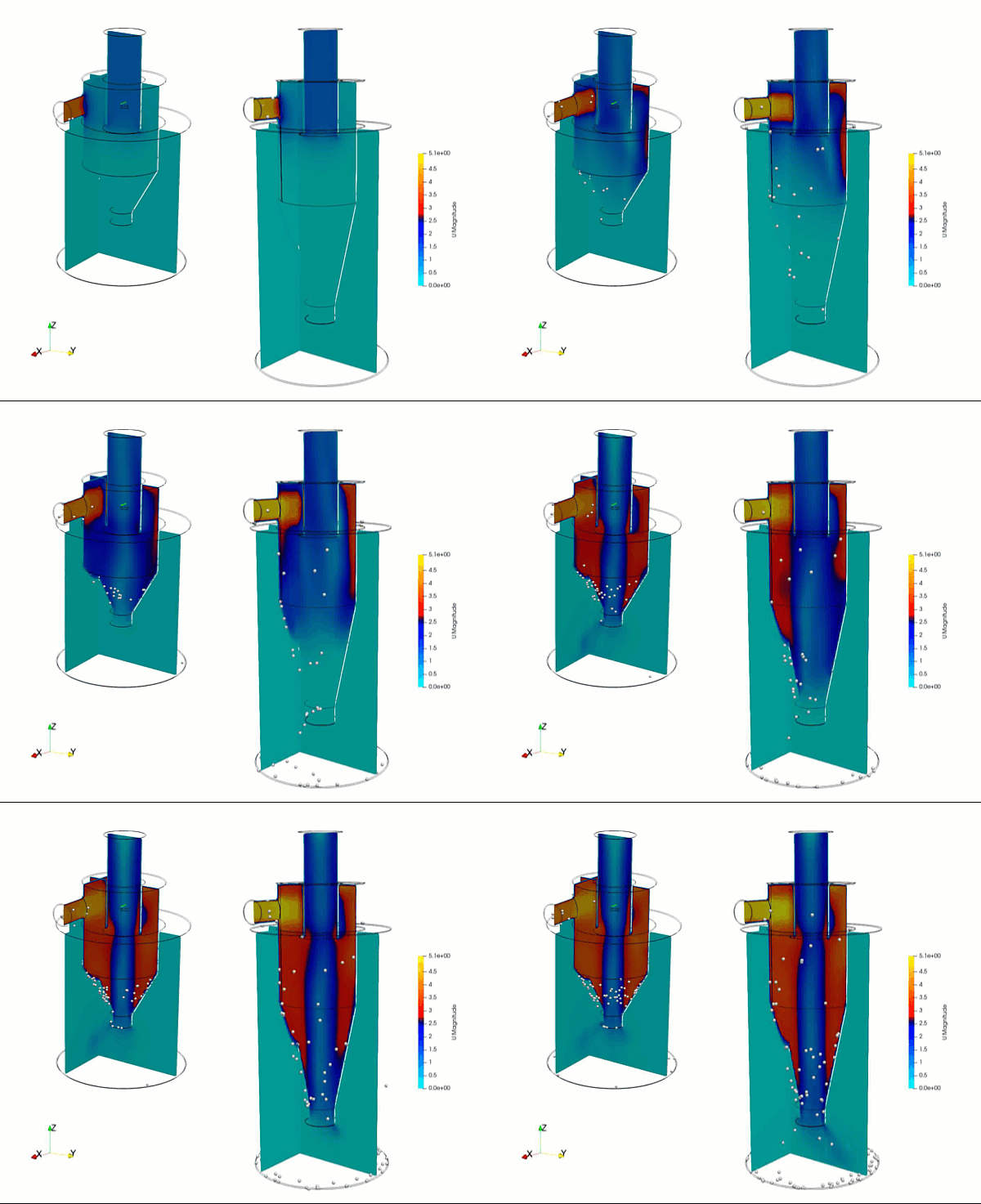
How the Fluid and Particles are Arranged
The template sets up a classic tangential-entry cyclone separator using standard air as the default fluid and a multi-size mix of quartz sand for the solid phase. The air current enters the main chamber sideways through an intake nozzle in the negative-x direction at 5 meters per second, creating a powerful internal vortex before escaping straight up through the top exhaust nozzle in the positive-z direction. Meanwhile, a polydisperse stream of 10,000 quartz sand particles is injected periodically directly into the incoming air. The software automatically tracks three distinct particle sizes—ranging from fine 0.3-millimeter dust up to larger 1.2-millimeter sand grains—while mapping exactly how they bounce off the walls, slide with a low friction factor of 0.02, and separate under high centrifugal force.
How to Run Your First Simulation
Running the simulation is handled through a few simple terminal commands inside a Docker container environment. First, you run a mesh pipeline command, which creates a background grid, uses your 3D shapes to carve out the internal fluid zone, and prepares the open wall surfaces for the particles. Second, you launch the primary coupled execution script to split the massive calculations across 8 parallel computer processors and begin the 20-second tracking timeline. Third, a post-processing script safely merges all the split processor data back together and translates the raw particle dumps once the calculation finishes. Finally, a cleanup script is available to wipe away old logs and grid data whenever you want a fresh start.
Adjusting Operating Conditions and Particles
Changing your basic operational settings is incredibly easy and does not require digging through complex sub-folders. You can open centralized settings files to quickly change target variables like incoming air velocity vectors, air density, fluid viscosity, and turbulence properties. To change the physical properties of the dust itself, you can easily open the particle input deck to type in a new total feed rate, adjust the mass fraction ratios of the different grain sizes, or adjust the computational stiffness setting that keeps the particles from unrealistically overlapping during high-speed wall collisions.
Changing the 3D Cyclone Shape
To swap in your own custom cyclone design, you drop your new 3D files into the geometry folders using standard .stl shapes scaled in meters. For the automated tools to direct the physics correctly, you must use specific naming conventions: the continuum fluid solver relies on capped inlet and outlet boundary surfaces, while the LIGGGHTS particle engine ignores the open ends and only tracks the main structural outer wall file. Make sure your virtual background mesh bounding box is slightly larger than your new 3D model so no edges are cut off, then rerun the mesh script from scratch to bake in the new hardware layout.
A Quick Warning
Please keep in mind that this template is a development version designed as an unresolved, spherical-particle demonstration. This means sub-100 micrometer cohesive dust behaviors are not enabled out of the box, and the background settings might not be perfectly optimized for every single scenario yet. The accuracy of the final answers depends entirely on your specific setup and mesh refinement calibration, so pt-tensor.com does not take responsibility for the final simulation data. Always validate your engineering results against physical experiment data.
Author: Caesar Wiratama
Find me on Linkedin