
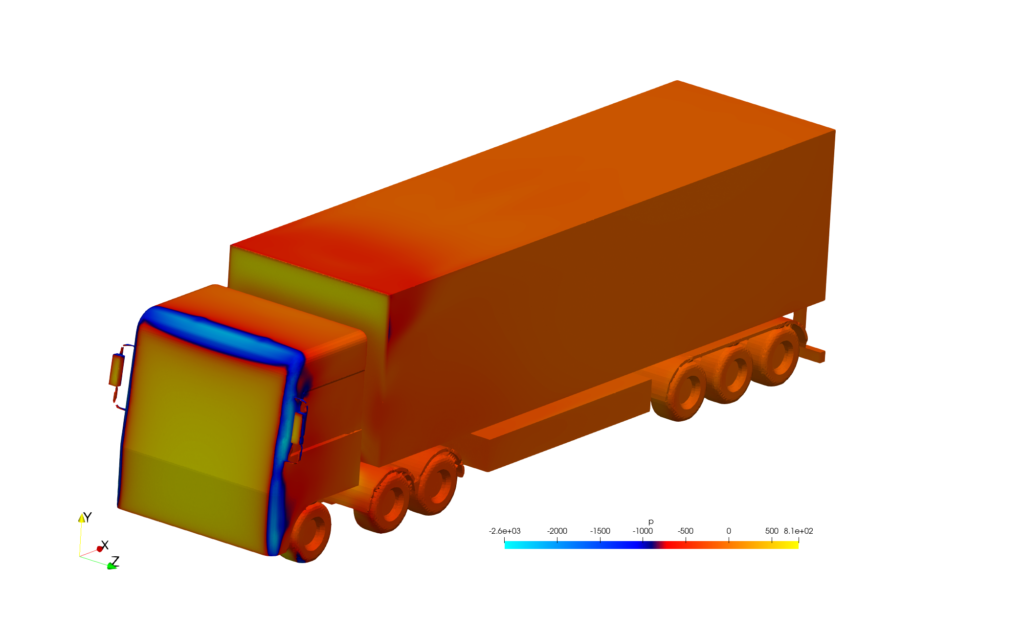
Introducing the tensorXFV Template
The tensorXFV template is a specialized folder within this project, created by author Caesar Wiratama, that focuses entirely on vehicle aerodynamics and ground transport. It is designed to simulate steady, normal-temperature air flowing around a moving object. While it is tailored specifically for ground vehicles, it can also be used to test aircraft, drones, buildings, and sporting goods. If you use this specific template for your work, all that is asked is that you mention and give credit to tensorXFV in your reports or projects.
How to Run Your First Simulation
Running the simulation only takes four simple commands in your computer’s terminal window. First, you run a command to unlock the automation scripts so your computer is allowed to open them. Second, you start the meshing script, which builds a virtual wind tunnel mesh around your object. Third, you launch the actual solver script to start the calculation. Finally, there is a cleanup script you can run whenever you want to wipe away old simulation data and start fresh.
Changing the 3D Vehicle Shape
To test your own design, you export your vehicle model as an .stl file, name it object.stl, and drop it into the template’s geometry folder. For the best results, you should ensure your virtual wind tunnel box is large enough to give your vehicle plenty of space in the front, back, and sides. To make things even easier, you can use the web-based mesh generator at tensorcalculators.com to automatically calculate the correct sizing numbers for your layout. Once your files are updated, you just run the mesh script to bake in your new shape.
Adjusting the Airflow and Wind Speed
You can customize exactly how the air behaves by editing the basic text files inside the template’s startup folder. For instance, if you want to test a vehicle at a higher speed, you just change the default velocity number to your desired speed. You can also tell the software how to treat the floor of the simulation—leaving it perfectly smooth like open air, or turning on friction to simulate a real road surface or moving-ground effect.
Author: Caesar Wiratama
Find me on Linkedin
Validation studies: